Weekly restaurant schedule template
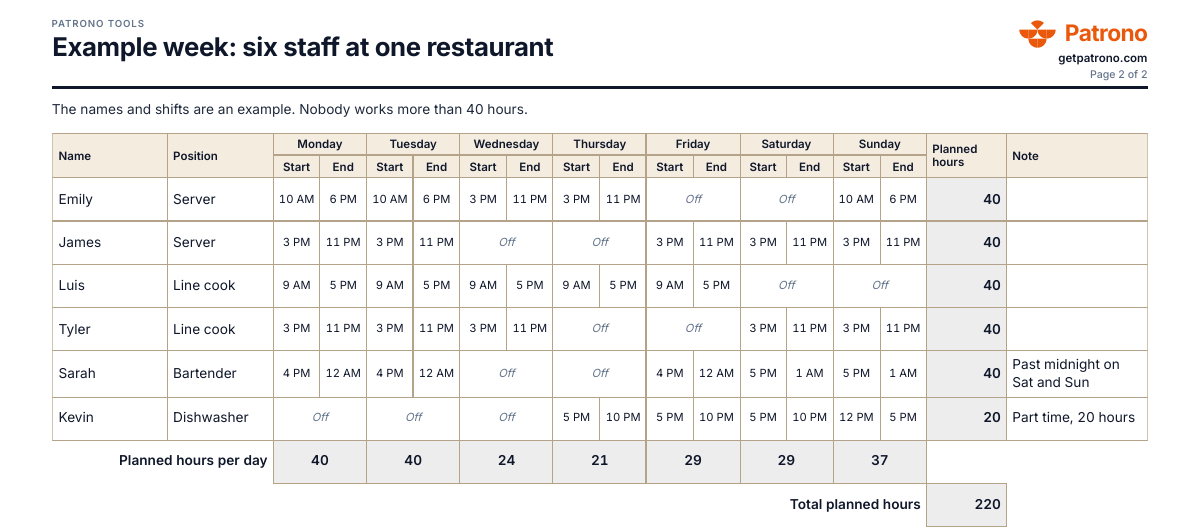
A weekly restaurant schedule with each person's shifts, start and end times in 12-hour format, and planned hours added up per person and per day. We email you an Excel workbook and a PDF to print on Letter paper.
A template from Patrono, the food safety, scheduling and food cost app for US restaurants.
Updated
What goes into the schedule
- 1.The week. The location, the week and the day you post the schedule.
- 2.Each person. Name and position, for example server, line cook, bartender or dishwasher.
- 3.Each shift. The start and end time for each day, as 7:00 AM. An empty day is a day off.
- 4.Planned hours. Added up per person and per day, also for a shift that runs past midnight. The template takes nothing off for breaks, so subtract unpaid breaks yourself.
- 5.A note. A split shift, a swap or part time.
Federal rules a schedule touches
These are the federal rules. Your state and city can require more, so check them before you post the week.
- 1.Overtime after 40 hours. Hours over 40 in a workweek are paid at one and a half times the regular rate (Fair Labor Standards Act, 29 U.S.C. §207(a)(1)). Some states also count overtime by the day.
- 2.Breaks. Federal law requires no meal or rest break, apart from break time to pump breast milk (29 U.S.C. §218d). Breaks of 5 to 20 minutes count as hours worked, and a meal period of half an hour or more with the worker fully relieved does not (29 CFR 785.18, 785.19). Many states require breaks.
- 3.Workers aged 14 and 15. Outside school hours only, at most 3 hours on a school day, 18 hours in a school week, 8 hours on a non-school day and 40 hours in a non-school week, between 7 a.m. and 7 p.m., or 9 p.m. from June 1 through Labor Day (29 CFR 570.35).
- 4.Notice. Federal law sets no notice period for a schedule. Some cities and states require larger chains to post schedules in advance.
A schedule is not the time record
A schedule is the plan. Federal law asks you to record the hours each worker actually works each workday and workweek (29 CFR 516.2(a)(7)), and you keep that record apart from the schedule.
The template
One line per person, with the start and end of each shift and the planned hours. We email you an Excel workbook and a PDF, Letter size.
Weekly restaurant schedule
Planned hours add up per person and per day. An empty day is a day off.
Location: ____________________________
Week of: __/__/____
| Name | Position | Mon | Tue | Wed | Thu | Fri | Sat | Sun | Planned hours |
|---|---|---|---|---|---|---|---|---|---|
| Emily | Server | 10 AM-6 PM | 10 AM-6 PM | 3 PM-11 PM | 3 PM-11 PM | Off | Off | 10 AM-6 PM | 40 |
| James | Server | 3 PM-11 PM | 3 PM-11 PM | Off | Off | 3 PM-11 PM | 3 PM-11 PM | 3 PM-11 PM | 40 |
| Luis | Line cook | 9 AM-5 PM | 9 AM-5 PM | 9 AM-5 PM | 9 AM-5 PM | 9 AM-5 PM | Off | Off | 40 |
| Tyler | Line cook | 3 PM-11 PM | 3 PM-11 PM | 3 PM-11 PM | Off | Off | 3 PM-11 PM | 3 PM-11 PM | 40 |
| Sarah | Bartender | 4 PM-12 AM | 4 PM-12 AM | Off | Off | 4 PM-12 AM | 5 PM-1 AM | 5 PM-1 AM | 40 |
| Kevin | Dishwasher | Off | Off | Off | 5 PM-10 PM | 5 PM-10 PM | 5 PM-10 PM | 12 PM-5 PM | 20 |
The names and shifts are an example.
Posted on: __/__/____
Build the week in one app
In Patrono you build the week and publish it. Each person gets an email with a link to their shifts, sees them in the browser on their phone, confirms them and asks for swaps. Start with 14 days. $0 today, cancel before day 15 and nothing is charged.
Frequently asked questions
What does it cost?
Nothing. Enter your email and we send you the files.
How do I make a restaurant schedule in Excel?
Enter each person's name and position, then the start and end of each shift, as 7:00 AM. The workbook adds up the planned hours per person and per day, also for a shift past midnight, and an empty day is a day off.
When is overtime due?
Hours over 40 in a workweek are paid at one and a half times the regular rate (Fair Labor Standards Act, 29 U.S.C. §207(a)(1)). Some states also count overtime by the day.
Can I build the schedule in an app?
Yes. In Patrono you build the week and publish it. Each person gets an email with a link to their shifts, sees them in the browser on their phone, confirms them and asks for swaps.